Neneda For life’s warm milestones
In Mom's kitchen, the bride types at the laptop, Mom sits beside her, and Abuela rests her hand on a wedding invitation.

Plan it with Mom. Plan it like a pro.

A wedding planner in Google Sheets, made for your computer.

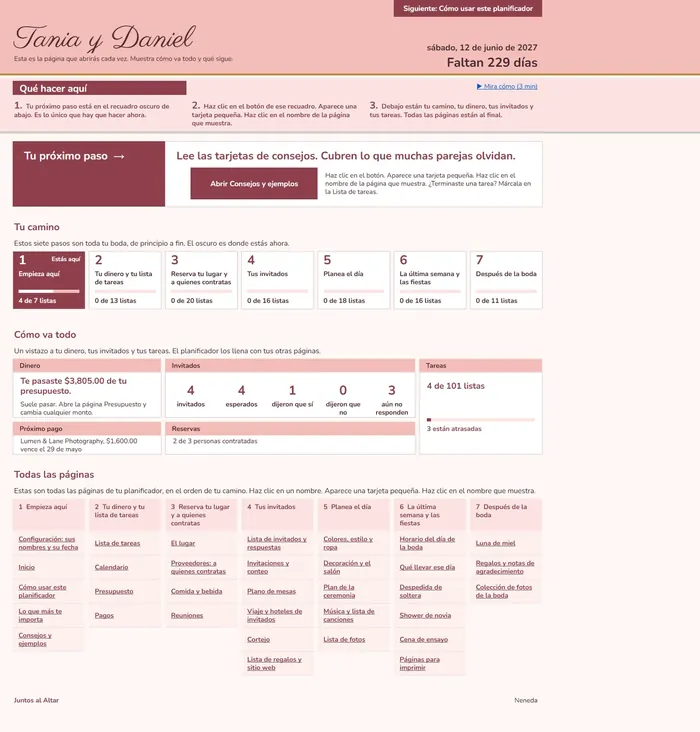
Spanish version included, for Mom or Abuela.

Made for your computer.

A free look

See the real pages first.

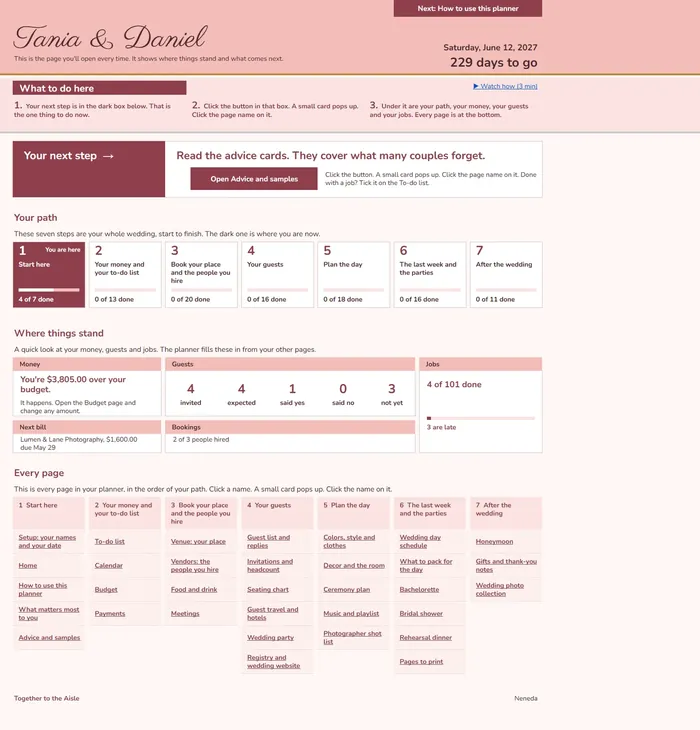
This is Tania and Daniel's Home page. Their date, the days to go, the money and the guests, all on one page. No email needed to look.

In Mom's kitchen in early spring, Mom types at the laptop while her daughter leans in with a hand on her shoulder.
HomeTania and Daniel
The planner's Home page for Tania and Daniel: their date and days to go, the next step, their path through the seven steps, their money, guests and jobs, and every page.

Each page in the seven steps has its own short video. The sample planner shows every page filled in.

How it works

Seven steps, start to finish.

Your whole wedding, in the order you need it. Open a step, and there are its pages.

A bride's hand holds a bouquet of blush peonies by a bright window.
What matters most to youStep 1
The page What matters most to you: Tania and Daniel's top three, place, food and drink, photos and video, and their wishes in their own words.

Step 1: Start here

Put in your names and your date. Then pick the three things that matter most to you.

Pages: Setup, Home, How to use this planner, What matters most to you, Advice and samples.

Wedding invitations and rings laid on soft tulle.
BudgetStep 2
The Budget page: a total of 30,000.00, each group with what is planned, quoted, promised and paid, and where the money stands.

Step 2: Your money and your to-do list

Set your budget once. The planner adds up what is quoted, promised and paid, and your to-do list keeps the jobs in order.

Pages: To-do list, Calendar, Budget, Payments.

A place setting with a gold charger plate and a menu card.
Food and drinkStep 3
The Food and drink page for Tania and Daniel: the caterer's price per guest, the menu, the drinks and the cake.

Step 3: Book your place and the people you hire

Keep your place, your vendors, the food and every meeting in one spot.

Pages: Venue, Vendors, Food and drink, Meetings.

Reception tables set outdoors at sunset.
Registry and wedding websiteStep 4
The Registry and wedding website page for Tania and Daniel.

Step 4: Your guests

The guest list, the replies, the seats, the travel and the registry, all together.

Pages: Guest list and replies, Invitations and headcount, Seating chart, Guest travel and hotels, Wedding party, Registry and wedding website.

A ceremony aisle lined with white flowers and chairs.
Ceremony planStep 5
The Ceremony plan page for Tania and Daniel: the order of the ceremony, the readings, the vows and the people in it.

Step 5: Plan the day

Your colors, the room, the ceremony, the music and the photos you want.

Pages: Colors, style and clothes; Decor and the room; Ceremony plan; Music and playlist; Photographer shot list.

A mother's hands at her daughter's beaded wedding gown.
Wedding day scheduleStep 6
The Wedding day schedule page for Tania and Daniel: the day hour by hour, who is where, and who to call.

Step 6: The last week and the parties

The day hour by hour, what to pack, and the parties before it.

Pages: Wedding day schedule, What to pack for the day, Bachelorette, Bridal shower, Rehearsal dinner, Pages to print.

Bare feet in the sand and a wedding dress hem at the water's edge.
HoneymoonStep 7
The Honeymoon page for Tania and Daniel: where they are going, the dates, the bookings and the budget.

Step 7: After the wedding

The honeymoon, the thank-you notes and your photos.

Pages: Honeymoon, Gifts and thank-you notes, Wedding photo collection.

In May, Mom types at the laptop while Abuela reads names from her old address book.
May, Mom's kitchen
In November, the bride holds up a piece of lace to show Mom on an iPad call.
November, her apartment

Bring Mom in

Plan it together, at her table or yours.

  • Share the sheetSend Mom the link from Google Sheets. She sees the same pages you do.
  • A short videoEach step has short videos that show what to do. Watch one together.
  • Spanish for AbuelaThe same planner in Spanish, with its own videos, so she can follow along.
From the Home lesson, with no sound.

What you get

Everything in one planner.

  • 34 pagesEvery part of the wedding, each on its own page.
  • One 7-step pathFrom your names and your date to the thank-you notes.
  • English and SpanishA planner in each language, for you, Mom and Abuela.
  • 35 short videosIn each language. Watch one, then fill in that page.
  • A quick start guideOne page that gets you going.
  • A filled-in sampleTania and Daniel's planner, so you can see it full.

In our Etsy shop.

  • For your computer.
  • A wedding planner in Google Sheets.
Ana Maria, known as Neneda, sits on a white fence with two young boys, in Brazil in 1979.
Ana Maria, Brazil, 1979.

Her story

Named for Neneda.

Her name was Ana Maria. Everyone called her Neneda. She kept the whole family organized by hand, and she always left a little for someone who had less.

5% of every sale goes to iCare4Kids, a children’s charity, in her honor.

Ana Maria, Brazil, 1979.

Questions

Before you ask.

Is it hard to use?

It is made to be easy. Each page in the seven steps has its own short video, and the sample planner shows every page filled in, so you can see how yours should look.

What do I need to use it?

A computer and a free Google account. The planner opens in Google Sheets.

Can Mom plan it with me?

Yes. Share the sheet with her from Google Sheets, the way you share any file. She sees the same pages you do.

Is the Spanish its own planner?

Yes. Same 34 pages, same seven steps, with its own short videos in Spanish.

More questions? Read the answers.

Hands on the kitchen table beside sealed wedding invitations.

For a mother

Give it to her.

Planning with your daughter? Find it in our Etsy shop, and give it to her.